
Fluent Forms Review (2026): A Form Builder that Focuses on Getting Work Done

Most WordPress form plugins promise the same thing: drag-and-drop simplicity, advanced features, and “no coding required.”
After a while, those phrases stop meaning anything.
What actually matters is whether a form plugin stays usable once your needs move beyond a basic contact form. Whether it helps you build, adjust, and scale forms without constantly fighting the interface—or worse, discovering that a crucial feature lives behind yet another paid add-on.
Fluent Forms has quietly built a reputation as a form builder that feels unusually complete out of the box. Not flashy. Not over-marketed. Just capable in ways that tend to matter once forms stop being decorative and start doing real work.
This review looks at Fluent Forms as a tool you would rely on long-term—not as a demo you’d try once and forget.
First impressions
The first thing Fluent Forms gets right is the experience of building a form.
This sounds obvious, but it’s where many form plugins stumble. Either the builder is visually cluttered, or it tries too hard to feel “modern” while hiding important controls behind layers of UI abstraction.
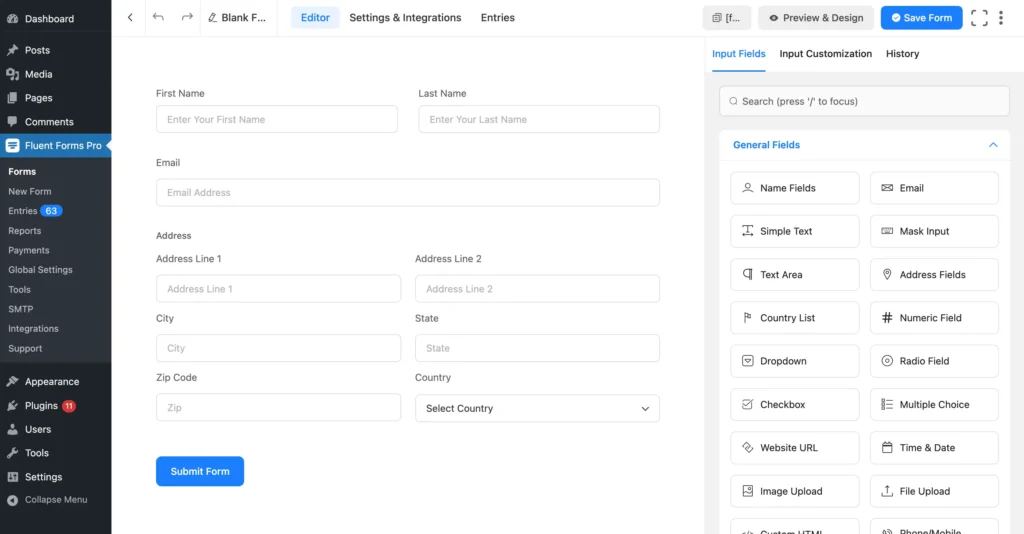
Fluent Forms’ drag-and-drop builder feels intentionally restrained. Fields are easy to add, rearrange, and configure. Settings are visible when you need them, and largely invisible when you don’t. There’s very little “Where did that option go?” friction.
You don’t need to understand Fluent Forms to start using it. You can open the builder and immediately begin assembling a form without committing to templates, predefined flows, or design decisions you’ll regret later.
That matters for agencies and developers, but it matters just as much for non-technical users. Fluent Forms doesn’t assume you’re a beginner—but it doesn’t punish you for being one either.
The builder also scales well. Simple forms stay simple. Complex forms don’t become unmanageable. This is where Fluent Forms quietly separates itself from tools that are easy at the start but brittle later.
The form builder itself
One of the more understated strengths of Fluent Forms is how it handles growth.
As forms become more complex—more fields, more logic, more steps—the builder doesn’t degrade into chaos. You’re not forced to juggle multiple interfaces, external add-ons, or fragile dependencies just to keep things organized.
Multi-column layouts, sectioning, repeatable fields, and containers behave predictably. The builder remains responsive even when forms grow large. This makes Fluent Forms particularly suitable for use cases like:
- Lead qualification funnels
- Application forms
- Multi-step onboarding
- Front-end content submission
- Payment and order flows
Nothing here feels experimental or half-finished. It feels like the plugin was designed with the assumption that people would push it beyond contact forms—and then kept using it.
Input fields
Before talking about logic, payments, or automation, it’s worth addressing the most fundamental question:
Does this plugin actually give you the fields you need?
Fluent Forms does—and then some.
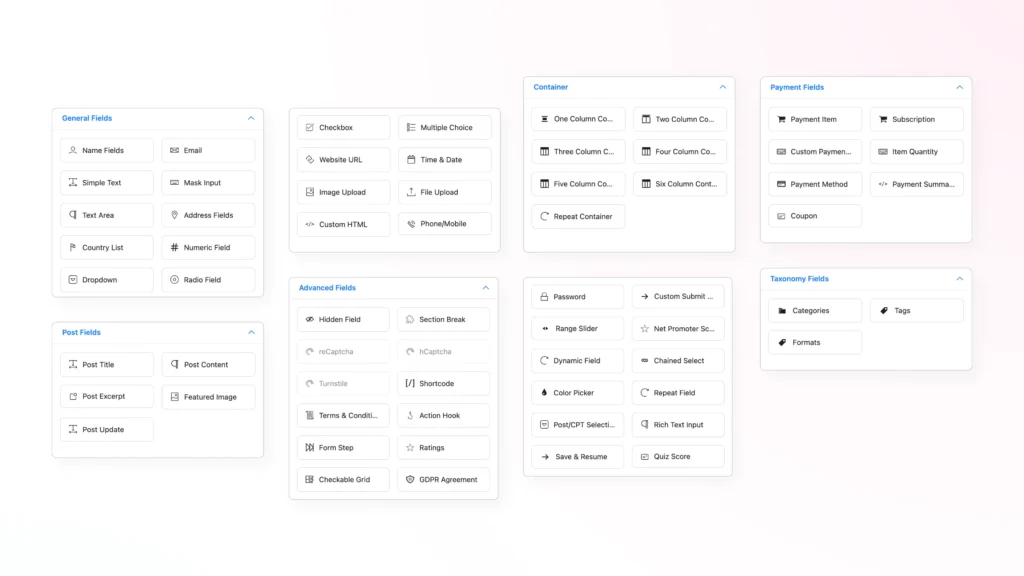
With more than 65 input fields, it covers nearly every practical scenario you’d expect from a serious WordPress form builder. Standard text and email fields are just the starting point. You also get:
- Advanced input types like masked inputs, rich text, ratings, sliders, grids, and repeatable fields
- Post and taxonomy fields that let users create or update content from the front end
- Payment-specific fields that support quantities, coupons, subscriptions, and summaries
- Layout and container fields that control the structure without custom CSS
What’s important is not just the number of fields, but how they work together. Fields feel consistent across different form types. You don’t have to relearn the builder every time you switch from a contact form to a payment form or survey.
For developers, the presence of action hooks and dynamic fields opens up deeper customization. For non-developers, the breadth of fields reduces the need for workarounds or extra plugins.
This is where Fluent Forms starts to feel less like a “form plugin” and more like a data collection system.
Conditional logic
Conditional logic is one of those features that quietly determines whether a form builder is a serious tool or a toy.
In Fluent Forms, conditional logic is available in the free version, which is not common in this category. Many popular form plugins reserve conditional logic for paid tiers, even though it’s essential for building responsive, user-friendly forms.
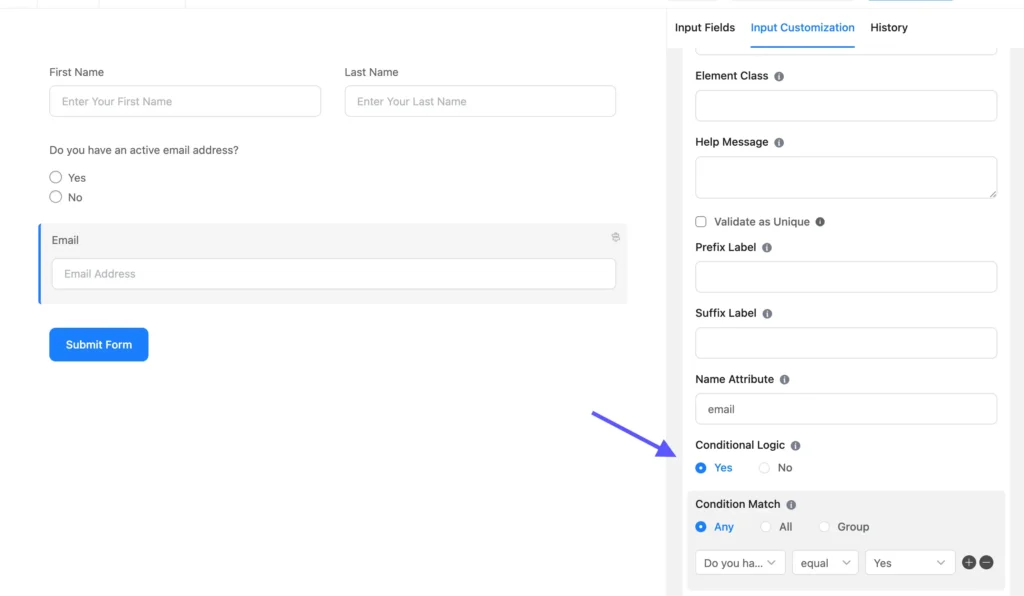
It allows forms to adapt to users instead of overwhelming them. Questions appear only when relevant. Irrelevant fields disappear. Confirmation messages change based on responses. Notifications route themselves intelligently.
This is how forms stop feeling like interrogations and start feeling intentional.
With Fluent Forms, conditional logic makes it possible to:
- Build smarter lead forms that quietly qualify users
- Reduce cognitive load by showing fewer fields at once
- Customize confirmations without multiple forms
- Handle internal workflows cleanly
The fact that this is available without upgrading makes Fluent Forms particularly attractive to users who want to build serious forms early—without committing financially before they’re ready.
Multi-step and conversational forms
Fluent Forms includes both multi-step forms and conversational forms, and importantly, it doesn’t treat either as a gimmick.
Multi-step forms are handled thoughtfully. You can break long forms into digestible steps, add progress indicators, customize navigation, and even capture partial entries when users abandon the form mid-way. That last point matters more than many realize—especially for long or high-intent forms.
Conversational forms deserve special mention.

Fluent Forms includes conversational forms in the free version, which is unusual. These forms present one question at a time, creating a more focused, less intimidating experience for users.
Used correctly, conversational forms can significantly improve completion rates—especially for surveys, onboarding flows, and lead generation. Fluent Forms doesn’t force you into a specific design language here. You can style conversational forms to match your site, control navigation, and even include welcome screens.
Add to that the Save & Resume feature, and Fluent Forms becomes suitable for forms that users may need to complete over time—applications, registrations, or long questionnaires.
Again, these are not “extra” features bolted on to impress. They integrate naturally with the rest of the system.
Calculations, quizzes, and surveys
This is one of Fluent Forms’ strongest—and most nuanced—areas.
The numeric calculation engine in Fluent Forms is powerful. It supports an extensive range of mathematical operations, including:
- Basic arithmetic
- Advanced operators (modulus, factorials, permutations, combinations)
- Trigonometric and logarithmic functions
- Summation and product formulas
- Rounding, ceiling, and floor operations
- Constants like π and e

From a capability standpoint, this allows you to build:
- Price calculators
- Quotation tools
- Financial estimators
- Grading systems
However, this power comes with a trade-off.
While the calculation engine is impressive, writing formulas is less user-friendly than the rest of Fluent Forms. A misplaced parenthesis or small syntax error can break a calculation, and debugging formulas requires care.
This is not a dealbreaker—but it is a learning curve. Compared to the intuitive drag-and-drop builder elsewhere, calculations feel more technical. Users who rely heavily on complex formulas will need patience and testing.
That said, once set up correctly, calculations work reliably and unlock use cases many form plugins simply can’t handle.
Quizzes and surveys build on this foundation with features like weighted scoring, grading systems, Net Promoter Score fields, and visual reporting. These are not surface-level features—they’re practical tools for collecting and interpreting user data.
Payments
Most WordPress sites that need to collect payments don’t actually need a full shopping cart.
They need something simpler and more controlled:
- A donation form
- A service booking payment
- A product order with limited inventory
- A subscription signup
- A one-off invoice or custom quote
This is where form-based payments make more sense than traditional e-commerce plugins. Fluent Forms understands that distinction—and builds directly for it.

Instead of forcing you into a catalog, cart, and checkout flow, Fluent Forms treats payments as structured form submissions with money attached. That sounds subtle, but it changes everything.
Fluent Forms supports a wide range of gateways, including Stripe, PayPal, Mollie, Square, Razorpay, Paddle, Paystack, and Authorize.net.
More importantly, Stripe payment fields are available in the free version. That alone puts Fluent Forms in a different category from many competitors, where payments are locked firmly behind paid tiers.
Once enabled, payment configuration lives where it should: inside the form builder. You can:
- Define one-time payments or recurring subscriptions
- Accept variable or fixed amounts
- Add quantity selectors and summaries
- Apply coupons and discounts
- Enable test mode before going live
This makes Fluent Forms especially suitable for businesses that want payments attached to context — not detached checkout pages.
Subscriptions are where many form plugins fall apart. Fluent Forms doesn’t.
Recurring payments are handled natively, with clear configuration and reporting. This makes it viable for:
- Membership signups
- Retainers
- Monthly services
- Ongoing donations
You’re not forced into WooCommerce subscriptions, extra add-ons, or complicated role-based workarounds. The subscription is part of the form logic, not a parallel system.
One of the more underrated payment features in Fluent Forms is inventory management.
You can define product quantities, show remaining stock, and automatically mark items as out of stock when limits are reached. For limited offers, event registrations, or product drops, this avoids overselling without requiring an eCommerce plugin.
Coupons and promotional codes are also handled directly within forms. You can create multiple coupons, define rules, and track usage.
Form security
Spam isn’t an edge case for WordPress forms. It’s constant, automated, and increasingly sophisticated. Anyone running a public form knows the pattern: junk submissions, fake offers, SEO spam, sometimes malicious links. The real cost isn’t just clutter—it’s missed leads and eroded trust in your data.
Fluent Forms avoids the false promise of a single “anti-spam solution.” Instead, it treats security as a layered system, combining multiple lightweight protections that work quietly in the background. That balance matters. Lock forms down too aggressively and real users bounce. Leave them open and bots walk straight through.
Crucially, spam prevention starts before submission. Honeypots, token-based validation, and interaction checks filter automated scripts long before entries reach your inbox. These methods are invisible to real users, which keeps friction low while blocking a large class of bot traffic.
Honeypot protection is especially effective. Bots that blindly fill every field expose themselves immediately, while humans never see the trap. Token-based protection adds another layer by ensuring a real page interaction occurred before submission. Missing or expired tokens result in instant rejection—no UI impact, no user frustration.
When stronger verification is needed, Fluent Forms doesn’t force a single CAPTCHA solution. It supports Google reCAPTCHA (v2 and v3), hCaptcha, and Cloudflare Turnstile, allowing site owners to choose based on audience, privacy expectations, and tolerance for friction. CAPTCHA is optional, not a requirement, and works best when combined with other defenses rather than used alone.
For text-heavy forms, Fluent Forms integrates with Akismet to detect content-based spam like SEO injections and phishing attempts. You control whether flagged entries are silently filtered or rejected outright, making it easy to tune strictness based on risk.
Not all spam is automated. Advanced form validation lets you define what acceptable data looks like—blocking nonsense entries, unwanted keywords, or invalid patterns before they ever reach storage. It’s subtle, but it dramatically improves data quality.
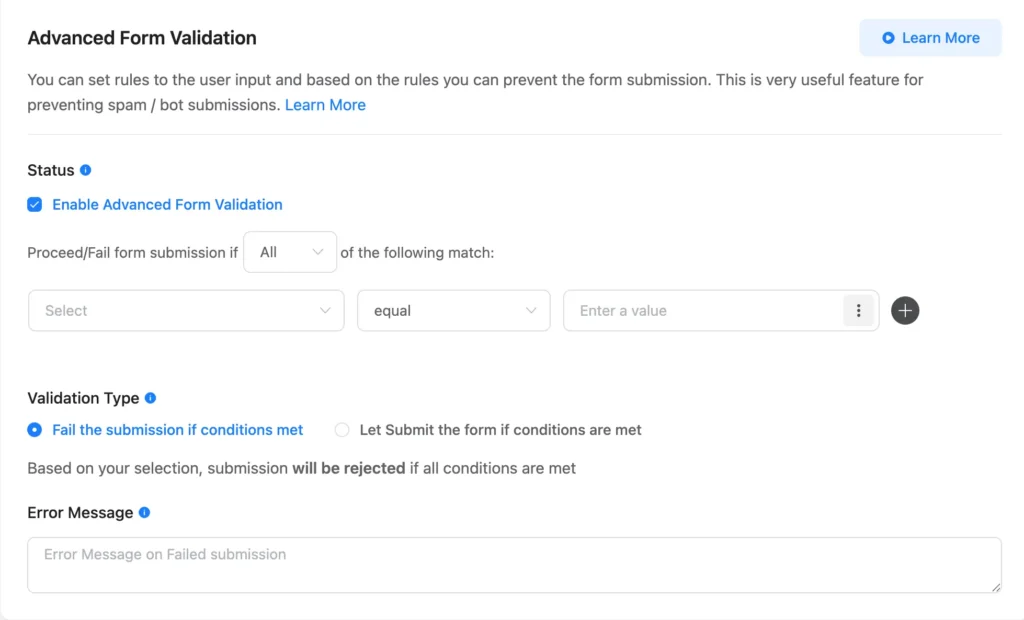
Fluent Forms also includes practical restrictions for real-world use cases. You can limit submissions by login status, IP address, country, keywords, or maximum entries. This is particularly useful for campaigns, registrations, and internal forms where abuse often comes from repetition rather than sophistication.
What ties everything together is restraint. Fluent Forms doesn’t treat every visitor as a threat or turn forms into obstacle courses. It layers invisible protections and escalates only when needed, preserving conversion rates while cutting down junk submissions.
Reporting dashboard
The reporting dashboard in Fluent Forms is more robust than most users expect.
Instead of treating submissions as static entries, Fluent Forms provides:
- Submission trends over time
- Completion rates for multi-step forms
- Geographic distribution
- Time-based heatmaps
- Payment summaries and breakdowns
- Integration and API logs
This turns forms into something you can evaluate and improve—not just deploy and forget.
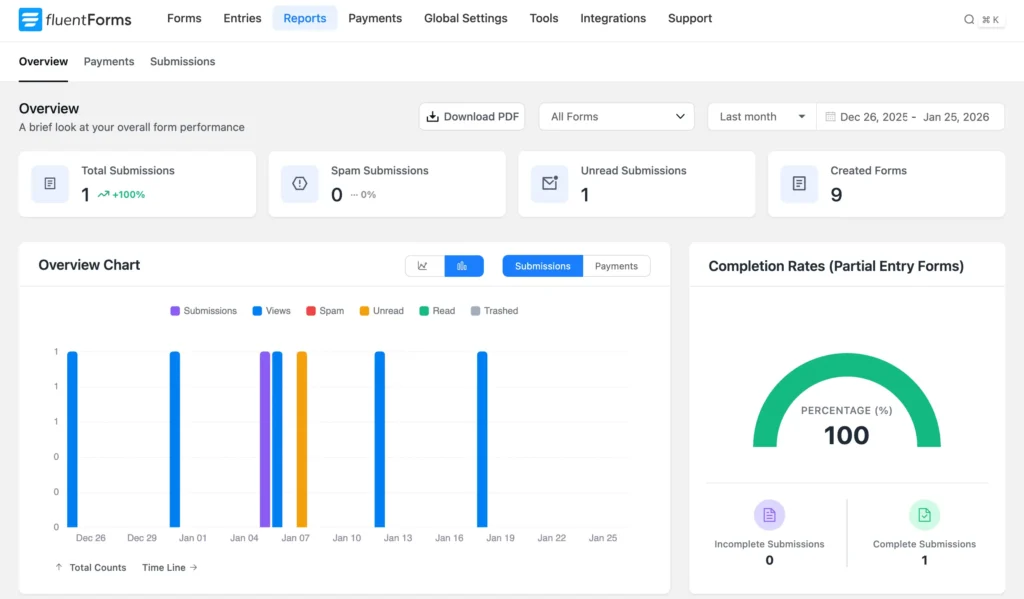
For agencies and businesses running multiple forms, this visibility saves time and reduces guesswork.
Integrations with popular tools
For most people, integrations are the real reason a form plugin sticks—or gets replaced. Forms rarely live in isolation. They feed CRMs, trigger emails, collect payments, push data into spreadsheets, fire automations, and sometimes do all of that at once.
Fluent Forms understands this reality well.
It offers 60+ integrations spanning multiple categories—email marketing, CRM, automation platforms, payment gateways, analytics, and developer workflows. More importantly, these integrations feel like a natural extension of the form builder, not an afterthought bolted on later.
The strength here isn’t just the number of connections available. It’s how easily forms can be wired into workflows without turning setup into a project of its own. You can map fields cleanly, apply conditions, and decide what happens after submission with a level of control that feels deliberate rather than overwhelming.
Another important detail: integrations aren’t artificially fragmented across plans or sold as individual add-ons. Once you’re on Pro, you get access to the full integration ecosystem. That keeps maintenance simple and avoids the creeping cost problem many form plugins suffer from over time.
For simpler setups, native integrations are often enough on their own. For more complex workflows, Fluent Forms also plays well with automation platforms and webhooks, which means it doesn’t lock you into a closed system. You can scale from basic lead capture to multi-step, multi-tool automation without having to replace the plugin.
From a practical standpoint, this makes Fluent Forms a good long-term choice. You don’t outgrow it quickly, and you don’t have to rebuild forms just because your stack evolves.
No add-on maze
One of Fluent Forms’ most practical advantages is its lack of dependency on paid add-ons.
Features like:
- Reporting dashboard
- Conversational form
- Payments
- Calculations
- Quizzes
- Conditional logic
…are built into the core product rather than fragmented across dozens of extensions. The only notable exception is the signature add-on.
This reduces complexity, improves reliability, and makes pricing easier to understand. You’re not constantly checking which feature lives where.
With 60+ third-party integrations, webhooks, and automation options, Fluent Forms fits comfortably into existing workflows—without forcing you to assemble a plugin ecosystem just to make forms useful.
Free vs Pro
Most WordPress plugins play a familiar game with their free version: give you just enough to build a demo form, then wall off anything remotely useful behind a paywall. Fluent Forms doesn’t completely reject that model—but it bends it in a way that’s surprisingly user-friendly.
The free version isn’t a teaser. It’s a functional form builder that can handle real work.
You get a generous set of input fields, conditional logic, conversational forms, payment support, spam protection, custom CSS/JS, email notifications, and even action hooks. That combination alone already puts Fluent Forms’ free tier ahead of what many competitors consider “starter” plans.
The most notable decision here is that conditional logic is available for free. That’s not a cosmetic feature. Conditional logic is what turns static forms into responsive ones—showing relevant questions, hiding unnecessary fields, and reducing friction for users. Many form plugins treat this as a premium-only capability. Fluent Forms doesn’t. That choice alone changes how usable the free version actually is.
Conversational forms being available in the free version is another quiet power move. These aren’t novelty layouts; they’re proven to improve completion rates for longer or more complex forms. Making them accessible without forcing an upgrade signals that Fluent Forms is confident users will want Pro later—not feel cornered into it.
Where Pro steps in is not to “fix” the free version, but to expand the ceiling.
Multi-step forms, advanced styling controls, numeric calculations, quizzes and surveys, advanced post creation, save-and-resume, conditional confirmations, and advanced validation all live on the Pro side. These features aren’t essential for every site—but when you need them, there’s no real workaround.
This is an important distinction. Fluent Forms doesn’t cripple the free version by removing core functionality. Instead, Pro unlocks complexity, scale, and refinement:
- More integrations (and deeper automation)
- Smarter data handling and validation
- Advanced UX patterns for longer or transactional forms
- More control over how forms behave after submission
Payments are a good example of this balance. You can accept payments in the free version, which is rare on its own. Pro then adds recurring payments, coupons, inventory management, detailed reporting, and more sophisticated transaction handling. You’re not blocked from monetization—you’re just given better tools to run it professionally.
Another thing worth calling out: Fluent Forms does not rely on paid add-ons to unlock major features. Everything listed here—except the signature field—is part of the core plugin. That matters more than pricing tables suggest. Add-on-driven plugins tend to fragment features, complicate updates, and inflate long-term costs. Fluent Forms keeps its feature set centralized and predictable.
So who should upgrade?
If you’re building simple contact forms, lead capture forms, or even basic payment forms, the free version may be enough longer than you expect. That’s not marketing talk—that’s a real reflection of how much functionality is unlocked upfront.
Pro makes sense when forms stop being “forms” and start being systems:
- multi-step flows
- calculations and pricing logic
- surveys, quizzes, and assessments
- advanced content submission
- serious automation and data handling
In short: Free is generous. Pro is deliberate.
Fluent Forms doesn’t pressure you to upgrade by breaking the free experience. It earns the upgrade by making advanced workflows genuinely easier once you need them—and that’s exactly how freemium should work.
Customer support
Form builders are not set-and-forget tools. They sit at the intersection of user input, email delivery, payments, automation, and third-party services—which means things will occasionally go wrong.
What matters then is support.
Fluent Forms consistently receives unusually positive feedback for its support on WordPress.org, and not in a vague “support is good” way. Users repeatedly mention response speed, technical accuracy, and actual problem resolution, not canned replies.
A common pattern emerges across reviews: people arrive with configuration issues, payment gateway problems, email delivery quirks, or integration questions—and leave surprised at how quickly and thoroughly the team responds.
This matters because many WordPress plugins treat support as a defensive operation. Replies are slow, answers are generic, and anything slightly technical gets deflected.
Fluent Forms’ support reputation suggests the opposite approach. The team appears comfortable dealing with real-world setups, not just ideal demo environments. That’s especially important for agencies and developers working under time pressure, where “we’ll look into it” isn’t good enough.
Another subtle but important point: users praise support even when using the free version. That’s rare. Many plugins reserve meaningful help strictly for paying customers, which creates friction early in adoption. Fluent Forms seems to understand that early trust leads to long-term users.
Good support doesn’t make headlines, but it changes how safe a plugin feels to adopt. In that sense, Fluent Forms’ support isn’t just a bonus—it’s part of the product’s reliability story.
Got it. Here’s a much shorter, sharper pricing section—still opinionated, still useful, no fluff.
Pricing
Fluent Forms keeps pricing refreshingly simple: pay by site count, not by features. Every Pro plan includes all features, updates, and priority support. No add-ons. No artificial limits.
Annual plans (most people should start here)
- $79/year – Single site
- $159/year – 5 sites (Agency)
- $299/year – Unlimited sites
Lifetime plans (for long-term users)
- $349 – Single site
- $599 – 5 sites
- $899 – Unlimited
The real pricing advantage is that Fluent Forms doesn’t nickel-and-dime:
- No paid add-ons for core features
- No feature gating between Pro tiers
- No surprise upgrades later
Once you’re on Pro, you’re fully equipped.
Final thoughts
Fluent Forms doesn’t try to impress you with novelty. It earns confidence by staying useful.
It’s easy to start with, hard to outgrow, and flexible enough to support everything from simple contact forms to complex workflows, payments, calculators, and surveys—without forcing you into add-on hell.
If you’re building or maintaining WordPress sites where forms actually matter, Fluent Forms is not just a good choice.
It’s a sensible one.